fangorn/huorn-minecraft
public
Huorn — in-game terminal emulator for Minecraft (Alacritty-powered)
| Type | ||
|---|---|---|
|
|
.architectury-transformer | — |
|
|
ci | — |
|
|
common | — |
|
|
docs | — |
|
|
fabric | — |
|
|
forge | — |
|
|
gradle | — |
|
|
rust | — |
|
|
.anvil-ci.yml | 1.0 KB |
|
|
.gitignore | 337 B |
|
|
build.gradle | 1.0 KB |
|
|
build_natives.sh | 2.4 KB |
|
|
FINDINGS.md | 12.6 KB |
|
|
gradle.properties | 403 B |
|
|
gradlew | 8.5 KB |
|
|
gradlew.bat | 2.8 KB |
|
|
INSTALL.md | 3.4 KB |
|
|
JOURNAL.md | 9.5 KB |
|
|
prompt.md | 993 B |
|
|
README.md | 3.4 KB |
|
|
run_server_client.sh | 2.2 KB |
|
|
settings.gradle | 316 B |
README.md
Huorn
A Minecraft Java Edition mod that embeds a fully functional Alacritty terminal emulator as an interactive block. Place a terminal block in your world, right-click it, and get a real shell session rendered on the block face.
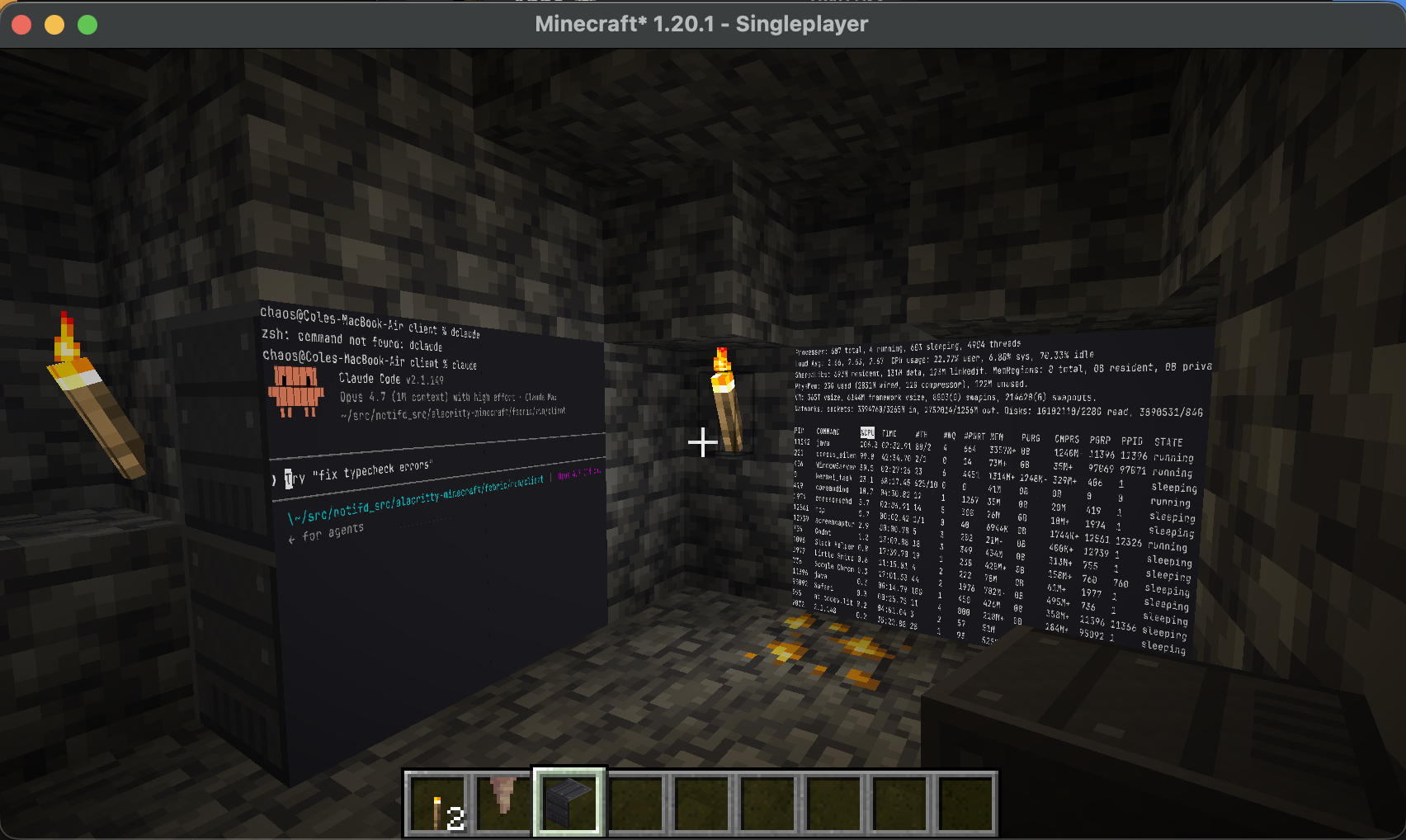
Features
- Real terminal emulation — powered by
alacritty_terminalv0.25 (same engine as the Alacritty desktop terminal) - Full ANSI color support — 256 colors + true color, bold, italic, underline, strikethrough
- In-world rendering — terminal content rendered as a texture on the block face using
fontduefont rasterization - Full-screen GUI overlay — press F12 for a larger view
- Focus mode — right-click to capture all keyboard input; ESC to exit
- Cross-loader — supports both Fabric and Forge via Architectury
- Local PTY — spawns a real shell process on the player’s machine
Requirements
- Minecraft Java Edition 1.20.1
- Fabric Loader 0.15+ with Fabric API, or Forge 47.2+
- Architectury API 9.2+
- macOS (aarch64) — other platforms need native library cross-compilation
Quick Start
Building
# Build the Rust native library
cd rust && cargo build --release

# Copy native to mod resources
mkdir -p common/src/main/resources/natives/macos-aarch64
cp rust/target/release/libhuorn_minecraft.dylib common/src/main/resources/natives/macos-aarch64/

# Build the mod (requires Java 21)
export JAVA_HOME=/opt/homebrew/opt/openjdk@21/libexec/openjdk.jdk/Contents/Home
./gradlew build
Running
# Launch Minecraft dev client
./gradlew :fabric:runClient
In-Game Usage
- Open creative inventory → “Huorn” tab
Or use:
/give @s huorn:terminal_block - Place the terminal block — it faces toward you
- Right-click the block to start the terminal and enter focus mode
- Type commands — all keyboard input goes to the terminal
- F12 — opens full-screen terminal overlay
- ESC — exits focus mode (returns to normal Minecraft controls)
- Mouse scroll — scrolls terminal history
Architecture
Shell Process (local PTY)
  ↓ raw bytes
alacritty_terminal VTE parser → grid cells (char + fg/bg + flags)
  ↓
fontdue glyph rasterizer + LRU cache (4096 glyphs)
  ↓
RGBA pixel buffer (Vec<u8> in Rust, ~1MB)
  ↓ JNI: nativeGetPixelData() → direct ByteBuffer
Java NativeImage → DynamicTexture → OpenGL texture
  ↓
BlockEntityRenderer (textured quad on block face)
Tests
# Rust tests (46 tests: glyph cache, renderer, key translation, terminal lifecycle)
cd rust && cargo test

# Java compilation verification
./gradlew build
Project Structure
rust/src/           — Native JNI library (Rust)
  lib.rs            — JNI entry points
  terminal.rs       — Terminal state, PTY, VTE parsing
  renderer.rs       — Pixel buffer renderer
  glyph_cache.rs    — fontdue font rasterization + LRU cache
common/src/         — Shared Minecraft mod code (Architectury)
  block/            — TerminalBlock, TerminalBlockEntity, ScreenGroup
  nativelib/        — NativeTerminal (JNI), NativeLoader (platform detection)
  client/           — Renderer, screen, input handling
  mixin/            — KeyboardHandler char input interception
fabric/             — Fabric-specific entrypoint
forge/              — Forge-specific entrypoint
Clone
git@anvil.fangorn.io:fangorn/huorn-minecraft.git
Recent Commits
5060eb3
2026-05-23 02:48
docs: add in-game screenshot to README
4c27881
2026-03-22 05:07
fix: terminal not starting — onPlayerInteract never called client-side
b08bda0
2026-03-22 04:59
fix: add terminal block to creative tab, improve block textures
f795f19
2026-03-22 04:52
fix: @ExpectPlatform package path for permissions
f6e43b8
2026-03-22 04:05
docs: add user-facing install guide for Fabric and Forge